Log in
WhatsApp Business using HubSpot

0 clicks
¡Widget Test automated!
sss
0 clicks
¡Widget Test automated!
sss
0 clicks
¡Widget Test automated!
sss
0 clicks
¡Widget Test automated!
sss
0 clicks
¡Widget Test automated!
sss
0 clicks
¡Widget Test automated!
sss
0 clicks
¡Widget Test automated!
sss
0 clicks
Tu Alivio - Bienestar Emocional
¡Cuidarte, también se ve bonito!
Local business
0 clicks
Reportaje Infantil en la Naturaleza
Solicitar Reserva
Local business
0 clicks
athenascake
athenacake
0 clicks
¡Widget Test automated!
sss
0 clicks
¡Widget Test automated!
sss
Previous
1
…
117
118
119
120
(current)
121
122
123
…
138
Next
Add the widget on your website
1. Copy this code
Your widget code
Copy code
Copied to clipboard
or your Key Number (
Learn how to add your Widget to your Wordpress website
)
Copy key number
Copied to clipboard
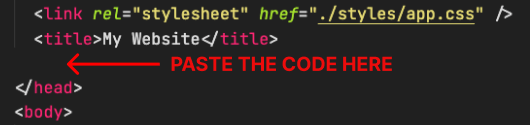
2. Paste the code
Place the code just before the </head> tag in the HTML of your website